
Salesforce를 사용하면 비즈니스 데이터와 파일을 효율적으로 관리할 수 있습니다. 그러나 Salesforce 파일 및 설정에 대한 올바른 권한 설정은 중요합니다. 이 블로그 포스트에서는 Salesforce 공식 도움말 문서인 "파일 및 설정 권한 관리"를 요약하고 필수 정보를 제공하겠습니다.
**1. 파일 및 라이브러리 액세스 권한:**
Salesforce에서 파일 및 라이브러리에 대한 액세스 권한을 관리할 때, "파일 및 라이브러리 액세스 권한 관리"를 통해 사용자와 그룹에 대한 파일 액세스를 구체적으로 제어할 수 있습니다. 이로써 데이터를 보호하고 필요한 사용자만이 파일 및 라이브러리에 접근할 수 있도록 할 수 있습니다.
**2. 외부 파일 공유 설정:**
Salesforce에서는 외부 조직과 파일을 공유하거나 연동할 수 있는 기능을 제공합니다. "외부 파일 공유 설정"을 사용하여 어떤 파일을 외부 조직과 공유할 것인지를 설정할 수 있으며, 이를 통해 외부 파트너 및 고객과의 협업을 원활하게 할 수 있습니다.
**3. 파일 라이프사이클 설정:**
"파일 라이프사이클 설정"은 파일을 보관하고 정리하는 방법을 관리하는 데 도움을 줍니다. 파일 보관 정책을 설정하여 오래된 파일을 자동으로 삭제하거나 보관할 수 있으며, 저장 공간을 효과적으로 관리할 수 있습니다.
**4. Salesforce Files 권한:**
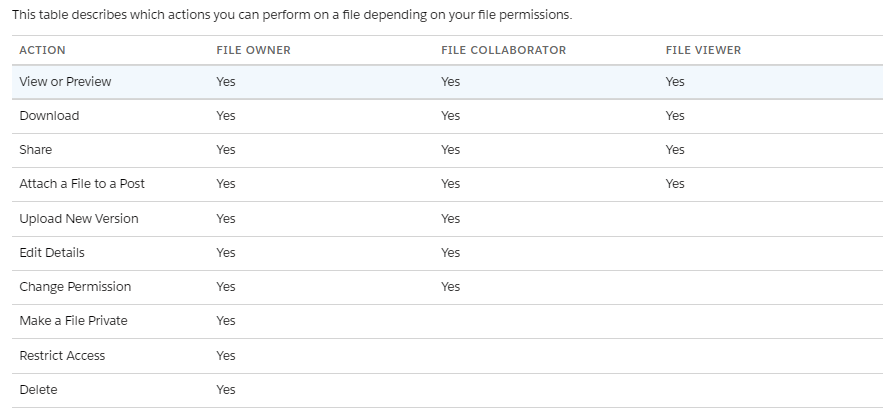
Salesforce Files는 Salesforce 내에서 파일을 관리하고 공유하는 데 사용되는 중요한 기능 중 하나입니다. "Salesforce Files 권한"을 사용하여 누가 파일을 볼 수 있고 편집할 수 있는지를 정의할 수 있으며, 데이터 보안을 강화할 수 있습니다.
**5. 필드 및 레코드 액세스 제어:**
파일과 관련된 데이터는 필드 및 레코드 수준에서도 제어할 수 있습니다. 필드 수준 보안 설정 및 레코드 공개 권한을 사용하여 특정 파일 및 라이브러리에 대한 액세스를 제한하거나 확장할 수 있습니다.
Salesforce 파일 및 설정 권한을 관리하는 것은 데이터 보안 및 협업에 중요한 역할을 합니다. Salesforce 도움말 문서를 자세히 읽어보고 조직의 요구 사항에 맞게 파일 및 설정 권한을 구성하여 비즈니스 프로세스를 최적화하세요.
"Managing Salesforce File and Permission Settings: Key Insights
Salesforce provides powerful tools for efficiently managing business data and files. However, correctly configuring permissions for Salesforce files and settings is crucial. In this blog post, we'll summarize and provide essential information from Salesforce's official help documentation titled "Managing File and Permission Settings."
**1. File and Library Access Permissions:**
When managing access permissions for files and libraries in Salesforce, you can use "File and Library Access Permissions Management" to precisely control file access for users and groups. This allows you to protect data and ensure that only authorized users can access files and libraries.
**2. External File Sharing Settings:**
Salesforce allows you to share or integrate files with external organizations. By using "External File Sharing Settings," you can specify which files should be shared with external organizations, facilitating smooth collaboration with external partners and customers.
**3. File Lifecycle Settings:**
"File Lifecycle Settings" help you manage how files are retained and organized. You can set file retention policies to automatically delete or archive old files, allowing for effective storage management.
**4. Salesforce Files Permissions:**
Salesforce Files is a critical feature for managing and sharing files within Salesforce. "Salesforce Files Permissions" allow you to define who can view and edit files, enhancing data security within your organization.
**5. Field and Record-Level Access Controls:**
Data related to files can also be controlled at the field and record levels. By utilizing field-level security settings and record sharing rules, you can further restrict or extend access to specific files and libraries.
Managing Salesforce file and permission settings plays a vital role in data security and collaboration. By thoroughly reviewing Salesforce's help documentation and configuring file and permission settings to meet your organization's requirements, you can optimize your business processes effectively.
'Salesforce' 카테고리의 다른 글
| [세일즈포스] File Privacy Settings: Enhancing Data Security (0) | 2023.09.26 |
|---|---|
| [세일즈포스] 컴포넌트 폴터 Component Folder (0) | 2023.09.26 |
| [세일즈포스] Create Lightning Web Component > 컴포넌트 정의(Define a Component) (0) | 2023.09.25 |
| [세일즈포스] 기본 이메일 제약 General Email Limits (0) | 2023.09.24 |
| [세일즈포스] 이메일 보낼 때 주의해야 할 제약사항 (0) | 2023.09.23 |


