iterator
To apply a special behavior to the first or last item in a list, use the iterator directive, iterator:iteratorName={array}. Use the iterator directive on a template tag.
Use iteratorName to access these properties:
- value—The value of the item in the list. Use this property to access the properties of the array. For example, {iteratorName}.value.{propertyName}.
- index—The index of the item in the list.
- first—A boolean value indicating whether this item is the first item in the list.
- last—A boolean value indicating whether this item is the last item in the list.
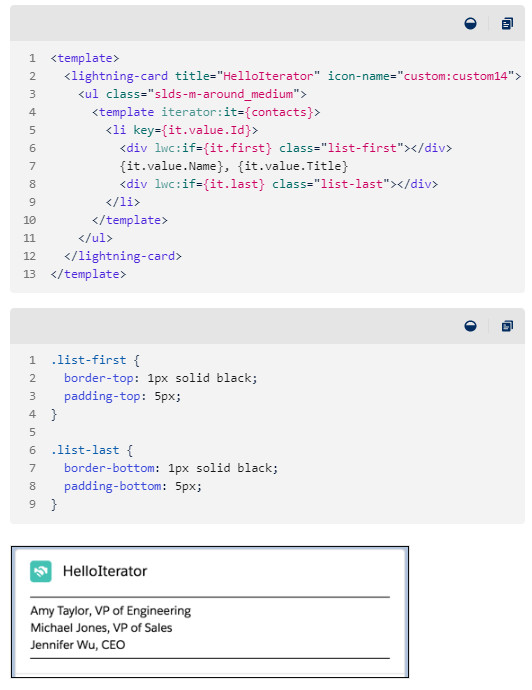
This sample code uses the same array as the previous example. To apply special rendering to the first and last items in the list, the code uses the first and last properties with the lwc:if directive.
If the item is first in the list, the <div> tag renders with the styling defined in the CSS list-first class. If the item is last in the list, the <div> tag renders with the styling defined in the CSS list-last class.
반복자
목록의 첫 번째 항목이나 마지막 항목에 특별한 동작을 적용하려면 지시문을 사용 iterator합니다 iterator:iteratorName={array}. iterator태그 에 지시어를 사용하세요 template.
iteratorName다음 속성에 액세스하는 데 사용됩니다 .
- value- 목록에 있는 항목의 값입니다. 배열의 속성에 액세스하려면 이 속성을 사용합니다. 예를 들어, {iteratorName}.value.{propertyName}.
- index- 목록에 있는 항목의 인덱스입니다.
- first- 이 항목이 목록의 첫 번째 항목인지 여부를 나타내는 부울 값입니다.
- last- 이 항목이 목록의 마지막 항목인지 여부를 나타내는 부울 값입니다.
이 샘플 코드는 이전 예제와 동일한 배열을 사용합니다. 목록의 첫 번째 항목과 마지막 항목에 특수 렌더링을 적용하기 위해 코드에서는 지시문과 함께 first및 last속성을 사용합니다 lwc:if.
항목이 목록의 첫 번째 항목인 경우 <div>태그는 CSS 클래스에 정의된 스타일로 렌더링됩니다 list-first. 항목이 목록의 마지막에 있는 경우 <div>태그는 CSS 클래스에 정의된 스타일로 렌더링됩니다 list-last.
'Salesforce' 카테고리의 다른 글
| [세일즈포스] B2B Commerce Cloud do? (0) | 2023.10.22 |
|---|---|
| [세일즈포스] 구성요소 IN LWC (1) | 2023.10.17 |
| [세일즈포스] Web Cart Object (0) | 2023.10.15 |
| [세일즈포스] B2B COMMERCE CLOUD (0) | 2023.10.14 |
| [세일즈포스] 장바구니 데이터 구조 (Cart data model) (0) | 2023.10.13 |


